
Business to business
Send an invoice payment link. Your customer pays in a few clicks.
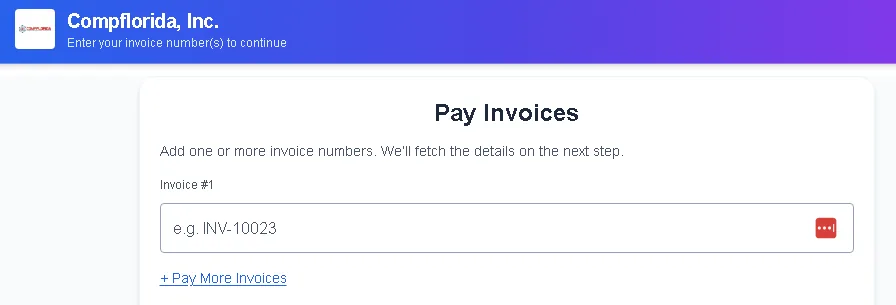
Built for invoices between businesses. Your customer sees your business name, the invoice number and the amount due, then pays by card.

Can you fix it?
Yes. Send the link with the invoice, not a week later.
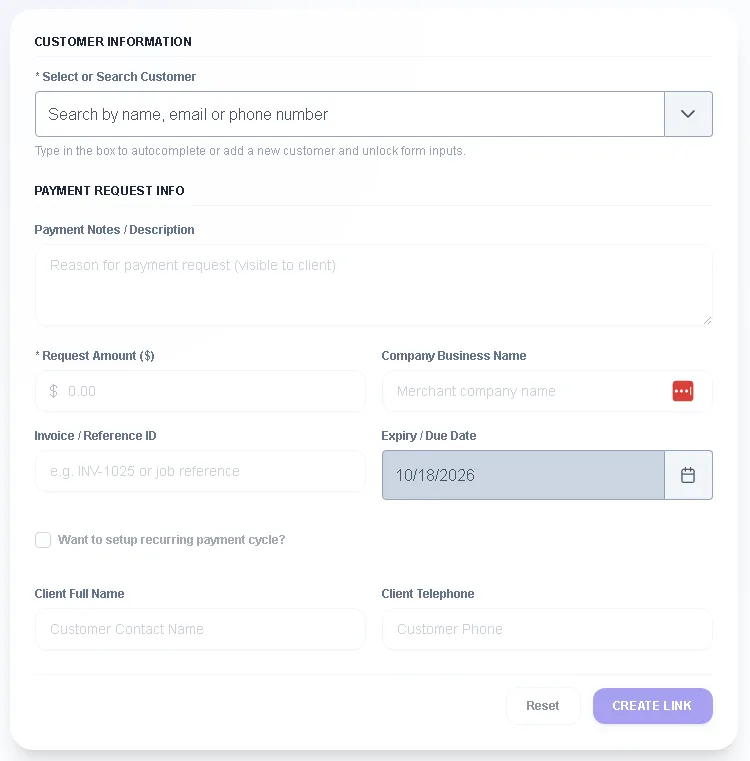
- Enter the customer, the amount and the invoice number
- The link is inside the invoice email you already send from QuickBooks Online. No second email
- The customer sees the same invoice number you sent
- You see the payment status in your dashboard
Can I trust you?
Your customer's card goes to the processor.
No card numbers with us
ApiCards never receives or stores full card numbers. Payment data goes to your payment processor for authorization and settlement.
Your business is reviewed first
Your payment processor reviews and approves your business before you can take payments.
Clear about what we don't do
Payment links are for paying invoices. We don't sell card terminals or run in-person payments.
What happens next?
Apply once, then send links from your invoices.
Apply at apicards.app
Start with the basics about your business.
Approval
A processor reviews your business and decides whether to accept it.
Send a link
Once approved, send a payment link from any open invoice.
Questions
Straight answers.
What does my customer see?
A payment page with your business name, the invoice number and the amount due. They enter a card and pay. They don't need an account.
Can I send a link for part of an invoice?
Confirm this with us before you rely on it. Ask on the phone or by email at [email protected].
Does my customer pay a fee?
It depends on how your processing is set up. When a card fee applies, the payment page shows it and the total before the customer pays. A card fee is not charged on debit cards.
Do I need card terminals?
No. Payment links work without card terminals. Your customer pays from their own device.
Who is it for?
Businesses that send invoices to other businesses and use QuickBooks Online.